こんにちはをうどんです。
前回Fcitxを入れて使用していたら自動起動しないことに気づいたので、解決策を書き留めておこうと思います。
解決策
色々調べた結果、アプリの自動起動をオンにすることで解決しました。
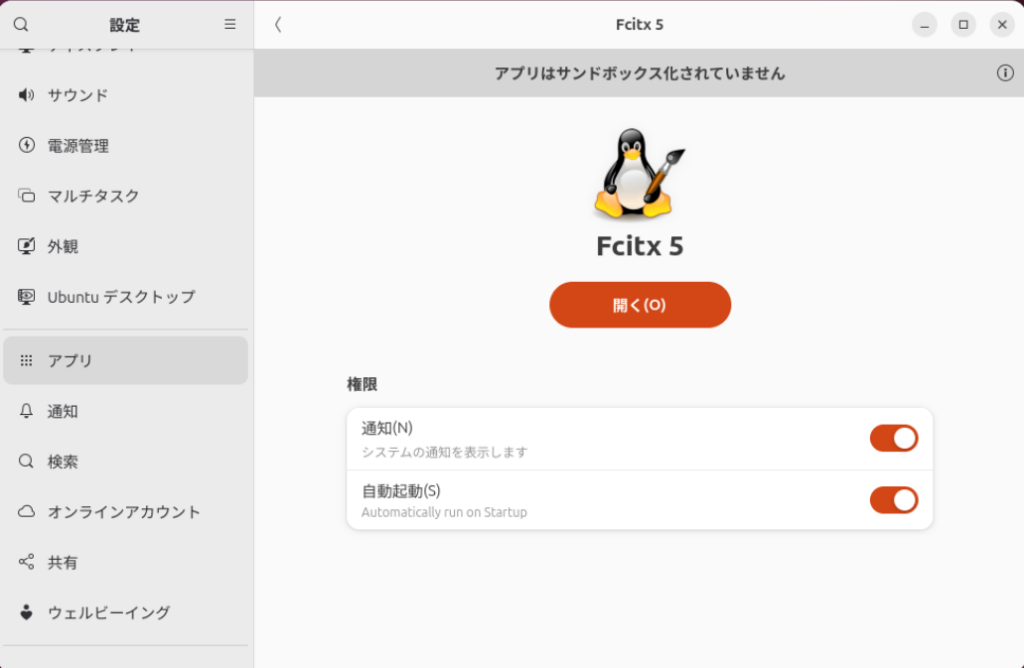
よく考えるとwindowsでもgoogle IMEはスタートアップアプリに入ってるもんなぁ。
This is a tool used by debian or debian based distribution. Just run
im-configfrom command line after login to your graphics interface and it should pop up a wizard, just select fcitx5 from it.
https://fcitx-im.org/wiki/Setup_Fcitx_5#im-config_(Debian/Debian-based/Ubuntu)
との記載もありましたが自動起動しませんでした。
ついで
ついでにこのコマンドを実行し、診断します。
fcitx5-diagnoseこのコマンドは
fcitx5-diagnose is a script that collects debug information from your system for diagnostic purpose.
https://fcitx-im.org/wiki/Fcitx5-diagnose
だそうです。
実行すると以下の画像(抜粋)のようにたくさん怒られるので対処していきます。
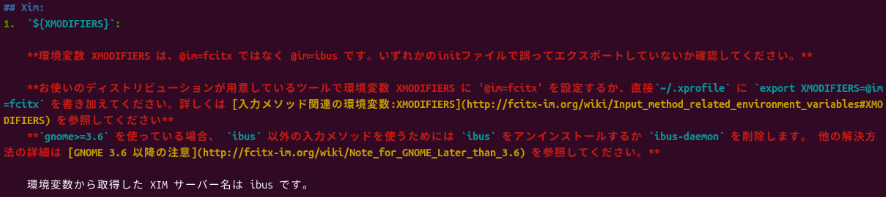
全体をまとめると
export XMODIFIERS=@im=fcitx
export GTK_IM_MODULE=fcitx
export QT_IM_MODULE=fcitx
を~/.xprofileに書けとのこと。しかし、waylandではxprofileは読まれないらしい…
というわけで~/.profileに書き込んでみました。
すると怒られなくなりました。
それぞれの変数の説明はこちら。
環境変数周りがむずかしい…
コメント